Google Shopping Feed

Has anyone ever attempted to create a product TSV feed for use with the Google Merchant Center / AdWords? Is that even possible? Just curious as we explore different avenues for sending our product data to Google.
-

Yes, it is pretty simple to do. Just find the google feed requirement page and then lay out your fields to match. The only slightly tricky part is the categories - google has their own requirements but if you have some vaguely analogous field in your data you can use meta fields to map to the google values. Let me know if you want to see screen shots or any more details
-
It has run very smoothly since it was created and has only needed altered when google change a policy or we need to improve some data.
Our feed is configured as shown below. Yours will change depending on how your data if configured, but this should give you a start. You just give google the url at the bottom of the feed screen and this will allow it to pull down the data on the schedule you enter.
I hope this helps, if you have any questions, please let me know.
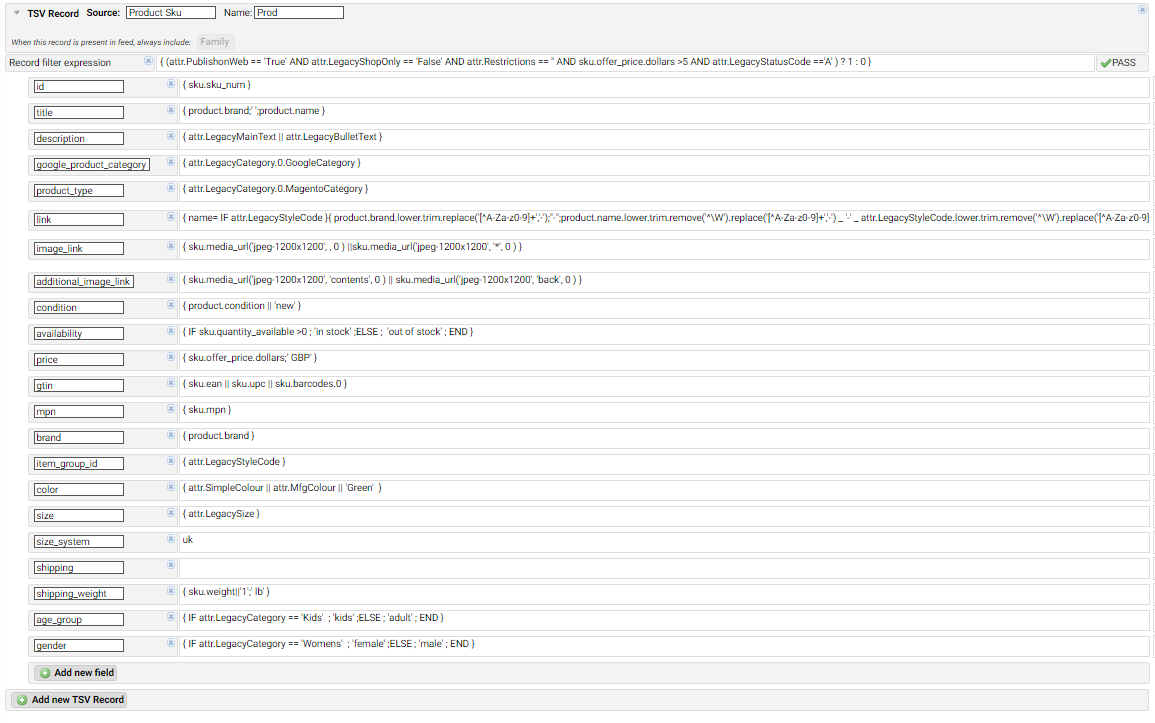
-

Thanks for posting that Alisdair!
My $0.02, but depending on your shopping cart, it might make sense to consider running this out of the endpoint that customers will interact with, that way you have 100% accurate pricing for what Google is going to find when they spider your site. If there is a difference in your feed vs what they find on page (in Magento Catalog Price Rule discounts will cause this), those products will be disallowed.
-
I agree - we don't use catalogue pricing - only cart pricing so this was not a problem. What we did find is that we have to use very careful product URL configuration in RO, consistent between both the Merchant centre and the Magento feeds, in order to end up with the correct URL on the listing.
We went this route to give us more flexibility in the products (and product data) we pass to merchant centre (Google has many restrictions on the categories of products they allow to be listed), many of the traditional extensions seemed very cumbersome to configure in the way we needed. This route also saved us some money.
-
Thanks for the help Alisdair, we're up and running now and it feels good to be in control over a wider array of customization. One issue I've come across is submitting multiple additional_image_link fields. The default TSV feed won't allow the same field name more than once, any way around that?
-
I did figure out a method to submit multiple additional images so thought I would share. Since our SKUs can range from having either 0-5 alternate images it looks like this...
{ IF sku.media_url('jpeg-1200x1200', 'two',0) }{ sku.media_url('jpeg-1200x1200', 'two',0) }{ END }{ IF sku.media_url('jpeg-1200x1200', 'three',0) }, { END }{ IF sku.media_url('jpeg-1200x1200', 'three',0) }{ sku.media_url('jpeg-1200x1200', 'three',0) }{ END }{ IF sku.media_url('jpeg-1200x1200', 'four',0) }, { END }{ IF sku.media_url('jpeg-1200x1200', 'four',0) }{ sku.media_url('jpeg-1200x1200', 'four',0) }{ END }{ IF sku.media_url('jpeg-1200x1200', 'five',0) }, { END }{ IF sku.media_url('jpeg-1200x1200', 'five',0) }{ sku.media_url('jpeg-1200x1200', 'five',0) }{ END }
Google accepts the values in the same field of a tsv file, separated by a comma.
Please sign in to leave a comment.
Comments
8 comments